I'm really happy about the recent creation of the new Eclipse Labs. While I would absolutely love to have my Diver project as an official Eclipse project in incubation, I'm afraid that the process is too heavy-weight. I work in research which often requires a very malleable programming schedule... I don't think that I would be able to hit the release targets of Eclipse. Plus the IP process can be a little long. My friend and colleague Ian Bull was able to make his Zest project an official Eclipse project (it is now part of GMF/draw2D) while he was doing his Ph.D... he did have a little programing help from some of the other members of our lab ;-). I'm a Masters student, though: the program is too short to wait for my project to be approved by the committers.
So, Eclipse Labs is exactly perfect for what I need. It has the benefit of the Eclipse brand, but it doesn't carry the baggage of official Eclipse projects. It's too bad that it wasn't available six months ago when I was making Diver a tool open to the public. The best option I had at the time was SourceForge, which has been quite good, really.
So, now I'm left with the question of whether or not to migrate Diver to the Eclipse Labs hosting. I would really like Diver to have a closer tie to the Eclipse brand. But, I would lose a lot of work that was put into creating the project content for Diver over at SourceForge. Most specifically, I would lose are the hard work that I put into creating the web site. Google code has its wiki, which is OK, but it isn't as rich as what I've been able to make with my web page.
So: to migrate, or not to migrate? I don't know. Is there any real benefit?
Thursday, June 3, 2010

Tuesday, May 25, 2010
New version of Diver available today!
Actually, it's been available for about a week, but I just haven't had time to blog about it. I've been busy with other work.
For those of you who don't know, Diver is a research project of the CHISEL group at the University of Victoria. We are trying to find better ways to help programmers develop, debug, and understand their software. Diver does this by bringing some techniques from reverse engineering into your Eclipse IDE. It can generate execution traces of your software which it uses to adjust the UI of your IDE to draw your attention to the features of your software that you are looking for. Diver is the product of several years of research and development, so it is feature-rich and robust. You can find out more about Diver at our website: http://diver.sf.net
OK, that's enough of the sell... I should let you know what you get with this new version of Diver.
If you already have Diver installed, you should be able to get the new version just by updating your Eclipse. Otherwise, you can use our p2 repository site: https://diver.svn.sourceforge.net/svnroot/diver/Release.
I hope that this new version will be useful to everyone. I've put a lot of hard work into it. It's 100% open source, so its free to you. But, please remember that Diver is a research project, so help me out with my research. Use it for a while, and then fill out our survey. Also, this new version of Diver has a logging feature that will keep track of some of your interactions with Diver. It's all anonymous information, and you can turn it off at any time (using the Workbench Logger) preference page. We don't get the data unless you explicitly agree to send it to us (Diver will ask you permission before uploading). But, please participate. I have to graduate sometime ;-).
Anyway, happy coding!
For those of you who don't know, Diver is a research project of the CHISEL group at the University of Victoria. We are trying to find better ways to help programmers develop, debug, and understand their software. Diver does this by bringing some techniques from reverse engineering into your Eclipse IDE. It can generate execution traces of your software which it uses to adjust the UI of your IDE to draw your attention to the features of your software that you are looking for. Diver is the product of several years of research and development, so it is feature-rich and robust. You can find out more about Diver at our website: http://diver.sf.net
OK, that's enough of the sell... I should let you know what you get with this new version of Diver.
| Faster Tracing | The tracer has been optimized. Tests indicate that it is between 2 and 4 times faster than version 0.1.0 |
| Capture Screenshots | You can now save screenshots of your sequence diagram. Select the "camera"  icon, icon,and you will be able to save an image of the main pane of the sequence diagram as a PNG, JPG, or BMP. 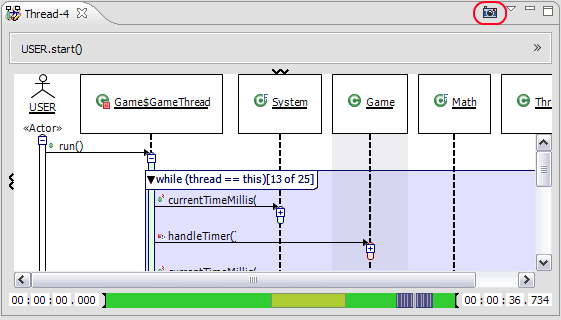 |
| Exporting Traces | Diver is now able to export a complete trace to be shared with your collegues.  |
| Importing Traces | If you can export, you have to be able to import. Use the import trace wizard to open a Diver Trace (dvt) file. The file will be imported and analyzed just as if you ran the trace yourself.  |
| Filtering Empty Threads | Diver keeps a record for all threads in your traces, even if no events occur in them. In previous versions, this could cause a lot of clutter in the Program Traces view. Now, you can filter empty threads and get rid of the clutter.  |
| Marking Code Executed in Jar Files | In previous versions, it wasn't possible to view executed lines of code in .class files contained in Jars because of limitations in Eclipse's Resource framework. So, I used Diver to figure out how the JDT sets breakpoints in Jar files, and I was able to use what I found to add markers to Jar files for use within Diver. 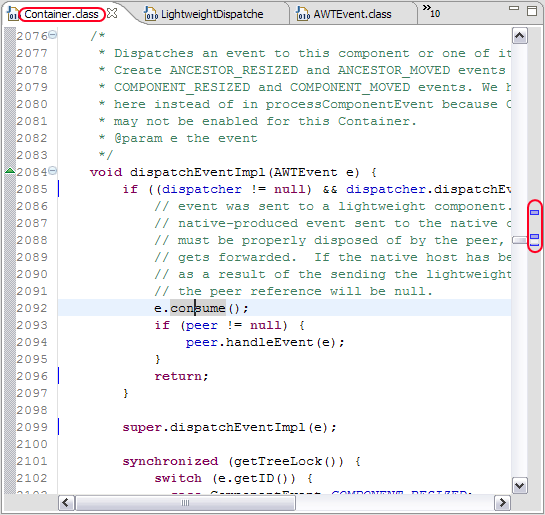 |
| Toggle Combied Fragments and Loops | If, for some reason (and I don't know what that would be :-) ), you don't like seeing your sequence diagram decorated with source code information, you can shut off combined fragments and loop compaction.  |
| Exceptions | If a method returns due to an exception, it is now indicated in the sequence diagram.  |
| Diver Research | Diver is a research project at the University of Victoria. Diver now makes it easier for you to help us with our research by logging information about how you use it. You can automatically upload these logs to our server, or you can shut off logging using the Workbench Logger preference page  |
If you already have Diver installed, you should be able to get the new version just by updating your Eclipse. Otherwise, you can use our p2 repository site: https://diver.svn.sourceforge.net/svnroot/diver/Release.
I hope that this new version will be useful to everyone. I've put a lot of hard work into it. It's 100% open source, so its free to you. But, please remember that Diver is a research project, so help me out with my research. Use it for a while, and then fill out our survey. Also, this new version of Diver has a logging feature that will keep track of some of your interactions with Diver. It's all anonymous information, and you can turn it off at any time (using the Workbench Logger) preference page. We don't get the data unless you explicitly agree to send it to us (Diver will ask you permission before uploading). But, please participate. I have to graduate sometime ;-).
Anyway, happy coding!
Tuesday, February 2, 2010
The Perils of Multi-Platform Eclipse Development
Writing code for multiple platforms is a challenge. It not only increases the complexity of your code and tests, but it also increases the complexity of your build process. The build process is what I have had trouble with as of late. So, I'm logging my struggles so that I, and you, might have some place to go the next time multi-platform deployment causes headaches.
So, here is my problem. I have a plug-in that has a little bit of platform-specific code in it. The code works on both windows and linux, and I have precompiled binaries for them. In other words, the build of the (C++) native code doesn't need to be part of my build process. I do that separately just because it is easier. Setting up cross-compilers is a nightmare, and takes more time than I have.
So, here is what I do: I separate my native code into plug-in fragments for windows and for linux. After that, I have to go through all of my different manifests to make sure that P2 knows what to do with the the fragments. First, a

OK, then I have to set up my fragments to make sure that the platform filters match their target environment:

Platform filters are basically read as a functional notation, where sets of attributes are bound to operators. For example,
OK, now one might expect that everything is ready to export. After all, the binaries don't depend on any native Eclipse fragments (they don't reference SWT or anything). So, it seems that my fragments should be able to be packaged up just like anything else.
That's not the case however. When you run a build in PDE, and you put a platform filter on a fragment, Eclipse checks your current target platform and builds only for what you currently have. I, for example, have a machine with Windows XP on it, and that is the version of Eclipse that I downloaded. So, Eclipse will build only the windows fragment for me. There is no option to build for other platforms. If I use the Export Deployable Features wizard, this is what I get:

Even though my fragments don't have any dependencies on any other platform-specific code and all I really need is a jar with my binaries in it, the PDE says, "No! I can't build that for you." OK, that's fine. I know that it is possible to build for multiple platforms (the SWT guys do it), so I did some searching.
It turns out that what I need is something called the Eclipse Delta Pack. The Delta Pack is basically a bunch of fragments for different platforms which include native code for user interfaces and other i/o such as file manipulation. Getting the Delta Pack can transform your Eclipse workbench into a catch-all platform which targets everything that Eclipse can manage.
The unfortunate thing is that the Delta Pack isn't that easy to find. If you go to the Eclipse Download page, you won't find any reference to it. You have to go down to the bottom of the page, and find the Classic Eclipse distribution. And select Other Downloads:

Once there, you will want to get the release that you are targeting (probably somewhere in the 3.5.1 stream or later), and look to the left-hand menu. You will find the Delta Pack there:

Or, you can follow this link for the 3.5.1 drop.
When you download the Delta Pack, you have to unpack it. Make sure that you don't unpack it over your current Eclipse install. That could make things go bad. Instead, unpack it somewhere else and you can tell Eclipse to add it to your target platform.
To do that, go to your Eclipse Preferences, and find the page for Target Platform, select the running platform, and Add the Delta Pack to it as an Eclipse Install:

After that's done, you will have a new magic option in your Export Deployable Features wizard called Export for multiple platforms. That's exactly what I was looking for!

So, one would think at this point that one could simply export all of the features, upload them to a P2 repository, and release the new version. Not so fast. If you are me and you do that, you get this bug report.
It was silly of me. I shouldn't have assumed that the build would work flawlessly without testing. So, I checked my P2 repository, and low-and-behold, the Linux fragment was missing. That seemed strange. After all I did export for Linux. There's no rocket science here. It's just a pre-compiled binary after all.
So, after hours of fighting with trying different combinations of platform filters, and different ways of building, there were no warnings and no errors in the build. Unfortunately, there was also no Linux fragment. It just would not get created on my windows box. I was about to go and file a bug on P2, when I decided that maybe I should just try to get the build on Linux. So, I went through all the above steps again on a fresh install of Eclipse on a Linux machine. What I expected to happen was that it would build fine on the Linux machine, but instead of not having a Linux fragment, I would be left without a windows fragment.
That isn't what happened. I did get a windows fragment. What was missing? You guessed it: the Linux fragment! My Linux machine failed to build the Linux fragment. But, at least I got an error this time:

It looks like there was something about my
I had used native code previously in an RCP toy application in which I was experimenting with OpenGL. When I looked up how to do it at that time, I learnt that I was supposed to use various keys such as

I didn't really know what to do, though since this is what I had read was correct, and it was previously working. In fact it still works for the different Windows versions. Not for Linux, though. I don't know why. So, after another hour or so on Google, I learned about the key

And it works! So, I learned a few things from this whole process:
Anyway, that is all for now. I hope this can be helpful to anyone who is doing builds for multiple platforms. It isn't an easy problem to solve, so there are bound to be pain points. This post will hopefully get you (and me) through them quickly next time.
So, here is my problem. I have a plug-in that has a little bit of platform-specific code in it. The code works on both windows and linux, and I have precompiled binaries for them. In other words, the build of the (C++) native code doesn't need to be part of my build process. I do that separately just because it is easier. Setting up cross-compilers is a nightmare, and takes more time than I have.
So, here is what I do: I separate my native code into plug-in fragments for windows and for linux. After that, I have to go through all of my different manifests to make sure that P2 knows what to do with the the fragments. First, a
p2.inf file has to be made for each fragment and the host plug-in, so that P2 knows the fragments are installable units that should be downloaded. OK, that's fine. Then, I have to the feature.xml for the feature that contains my plugins and fragments to make sure that I specify the supporting environments:
OK, then I have to set up my fragments to make sure that the platform filters match their target environment:

Platform filters are basically read as a functional notation, where sets of attributes are bound to operators. For example,
(|(osgi.arch=x86)(osgi.arch=x86_64)) binds the selection of the attributes (osgi.arch=x86 and osgi.arch=x86_64) to the logical OR operator (|), so that it reads, "the osgi architecture can be either x86 or x86_64." So, I've got that down. I also had to set up the Bundle-NativeCode attribute in the manifest for the fragment so that my application knows where to find the binaries, but I'll get back to that later.OK, now one might expect that everything is ready to export. After all, the binaries don't depend on any native Eclipse fragments (they don't reference SWT or anything). So, it seems that my fragments should be able to be packaged up just like anything else.
That's not the case however. When you run a build in PDE, and you put a platform filter on a fragment, Eclipse checks your current target platform and builds only for what you currently have. I, for example, have a machine with Windows XP on it, and that is the version of Eclipse that I downloaded. So, Eclipse will build only the windows fragment for me. There is no option to build for other platforms. If I use the Export Deployable Features wizard, this is what I get:

Even though my fragments don't have any dependencies on any other platform-specific code and all I really need is a jar with my binaries in it, the PDE says, "No! I can't build that for you." OK, that's fine. I know that it is possible to build for multiple platforms (the SWT guys do it), so I did some searching.
It turns out that what I need is something called the Eclipse Delta Pack. The Delta Pack is basically a bunch of fragments for different platforms which include native code for user interfaces and other i/o such as file manipulation. Getting the Delta Pack can transform your Eclipse workbench into a catch-all platform which targets everything that Eclipse can manage.
The unfortunate thing is that the Delta Pack isn't that easy to find. If you go to the Eclipse Download page, you won't find any reference to it. You have to go down to the bottom of the page, and find the Classic Eclipse distribution. And select Other Downloads:

Once there, you will want to get the release that you are targeting (probably somewhere in the 3.5.1 stream or later), and look to the left-hand menu. You will find the Delta Pack there:

Or, you can follow this link for the 3.5.1 drop.
When you download the Delta Pack, you have to unpack it. Make sure that you don't unpack it over your current Eclipse install. That could make things go bad. Instead, unpack it somewhere else and you can tell Eclipse to add it to your target platform.
To do that, go to your Eclipse Preferences, and find the page for Target Platform, select the running platform, and Add the Delta Pack to it as an Eclipse Install:

After that's done, you will have a new magic option in your Export Deployable Features wizard called Export for multiple platforms. That's exactly what I was looking for!

So, one would think at this point that one could simply export all of the features, upload them to a P2 repository, and release the new version. Not so fast. If you are me and you do that, you get this bug report.
It was silly of me. I shouldn't have assumed that the build would work flawlessly without testing. So, I checked my P2 repository, and low-and-behold, the Linux fragment was missing. That seemed strange. After all I did export for Linux. There's no rocket science here. It's just a pre-compiled binary after all.
So, after hours of fighting with trying different combinations of platform filters, and different ways of building, there were no warnings and no errors in the build. Unfortunately, there was also no Linux fragment. It just would not get created on my windows box. I was about to go and file a bug on P2, when I decided that maybe I should just try to get the build on Linux. So, I went through all the above steps again on a fresh install of Eclipse on a Linux machine. What I expected to happen was that it would build fine on the Linux machine, but instead of not having a Linux fragment, I would be left without a windows fragment.
That isn't what happened. I did get a windows fragment. What was missing? You guessed it: the Linux fragment! My Linux machine failed to build the Linux fragment. But, at least I got an error this time:

It looks like there was something about my
Bundle-NativeCode property in the Linux fragment which the PDE build system didn't like. So, I went to investigate it.I had used native code previously in an RCP toy application in which I was experimenting with OpenGL. When I looked up how to do it at that time, I learnt that I was supposed to use various keys such as
processor= and os= to tell the plug-in when to use different compiled libraries. In fact, that is what I used in previous versions of Diver. When both the Windows and Linux binaries were in one fragment, it worked fine. But apparently, now that I had them in two fragments, that was very, very wrong:
I didn't really know what to do, though since this is what I had read was correct, and it was previously working. In fact it still works for the different Windows versions. Not for Linux, though. I don't know why. So, after another hour or so on Google, I learned about the key
selection-filter which works in the same way that the Eclipse-PlatformFilter does. So, I copied my platform filter into the Bundle-NativeCode like this:
And it works! So, I learned a few things from this whole process:
- You Need The Delta Pack. Why you need it for all multi-platform builds, I don't know. In my example, all I needed was to package up pre-compiled binaries into jar files. There doesn't need to be any dependency resolution for that, but the PDE needs the Delta Pack to do the build. That is relatively painless, so I don't mind.
- Pay Attention to the
Bundle-NativeCodeFormat. Eclipse won't necessarily tell you what is wrong. It might just fail to build a fragment or two without you even noticing. The safest way to get it to work just seems to be to copy yourEclipse-PlatformFilterdirectly into theBundle-NativeCodeproperty. At least you don't have to manage multiple different syntaxes that way.
Anyway, that is all for now. I hope this can be helpful to anyone who is doing builds for multiple platforms. It isn't an easy problem to solve, so there are bound to be pain points. This post will hopefully get you (and me) through them quickly next time.
Diver 0.1.0 Released (For Real This Time)
If anyone tried to download Diver 0.1.0 last week on their Linux boxes, you may have had a little trouble. It turns out that I didn't have everything set up correctly for a multi-platform build, and the Linux plugins weren't getting created. I'm going to blog about my experience in a minute, to keep it for posterity so that I can remember how to do it. Hopefully it will be useful for others as well. For now, here is a pretty picture to prove to you that things are good to go for you Linux users.

If you downloaded for Windows last week, I think that you should be fine. But, there won't be any harm in updating.

If you downloaded for Windows last week, I think that you should be fine. But, there won't be any harm in updating.
Wednesday, January 27, 2010
Diver 0.1.0 Released
There is a new version of Diver out, with a few new features which should make reverse engineering easier in Eclipse. A couple of highlights are the new "Notes" feature which can be accessed using Eclipse's Properties View, and the new Trace Search Page which helps you to find things in your traces. Diver is also a lot smaller in terms of its memory footprint now. For more information on what's new, check out the New To Diver 0.1.0 Page. To get Diver, just point your P2 "Available Software Sites" to https://diver.svn.sourceforge.net/svnroot/diver/Release. Diver works on Windows and Linux.
Some fancy pictures of the new features:

The new Diver Trace Search

Finding all the activations of methods that start with
get*
Finding all personalized notes stored in a trace
Friday, January 22, 2010
Diver tutorial videos available
Reverse engineering tools have traditionally suffered from a tremendous lack of adoption. There are likely several reasons for this. One is that they tend to come out of academia, and they never really get past the prototype stage. That is a shame because a lot of the ideas that have been proposed are really good ones. Another reason that they aren't often adopted is because it can be difficult to understand how to use them. The tools can be very cumbersome or they aren't very well documented.
I've tried to overcome both of these issues with Diver so that people will be able to see its use and it can be widely adopted. I have to say, my motivations aren't entirely altruistic: I do have to get my thesis done :-).
I've written a lot of in-depth documentation for Diver. But, let's be honest, I'm not even interested in reading all of those pages of documentation. So, for those of us with a shorter attention span, I've published several tutorial videos to get you started.

By the way, I made these tutorials using Wink. I highly recommend it for anyone who has to make a tutorial of their software. It's very easy to use and it gives you pretty well all the features that you could ask for. I searched for free screen capture software for a long while. This is the best that I could come by. If you've got any other suggestions, let me know.
Thursday, January 21, 2010
Survey on Reverse Engineering
Though I'm really a coder at heart, I am a researcher by day. I've been working hard on the Diver project to try and figure out ways that reverse engineering can be used to aid coders like you and me. If you've downloaded it and used it, please fill out my survey.
If you haven't tried Diver yet, please try it. I'm really hopeful that it can help you Java developers out.
If you haven't tried Diver yet, please try it. I'm really hopeful that it can help you Java developers out.
Subscribe to:
Posts (Atom)