Tuesday, December 21, 2010

See you at EclipseCon!

I felt like I won an award this morning when I found this in my email:


Dear Del Myers,
        
We are pleased to accept your proposal "Put It In Reverse: Using Eclipse to
Understand Code that has Already Been Written" for EclipseCon 2011. 

The Program Committee received many excellent submissions, and we're 
very happy to include "Put It In Reverse: Using Eclipse to Understand Code
that has Already Been Written" in that select set.

Thank you for helping to make EclipseCon 2011 the best one yet!

I'm certain that EclipseCon will be excellent, and I hope to do my part in making it that way. So, everyone come and check out my talk if you have the time: https://www.eclipsecon.org/submissions/2011/view_talk.php?id=2099

Tuesday, December 7, 2010

Interview about Diver


The online magazine JaxEnter.COM recently interviewed me about my tool Dynamic Interactive Views for Reverse Engineering (Diver), which is an open source tool for bringing reverse engineering processes into the hands of us ordinary developers. Wondering what this tool has to offer? Check out the interview: http://jaxenter.com/diver-interview-32838.html

Thursday, November 25, 2010

Diver version 0.3.0


Last night, I released version 0.3.0 of Diver. It has been a while since I've written here. I've been busy with other work that had to be done. So, for those who may no longer be familiar with Diver, I will take a moment to step back and let you know what it is all about.

Diver stands for Dynamic Interactive Views for Reverse Engineering. The basic of Diver is to make some reverse engineering tools and techniques easily accessible to us Java developers who use Eclipse. Some really common problems that I have had in maintaining software are trying to figure out answers to questions like, "Why did that happen?",  "Where is that implemented?" and, "How does that work?" Diver offers tools to help you answer those kinds of questions. The techniques realized in Diver use execution traces of your running Java software so that you can get a picture of what is really going on at runtime rather than having to guess at what might be happening based on class hierarchies or keyword and reference searches. It isn't meant to replace your current debugging and investigation techniques. It is meant to offer you a few extra tools to augment your current work practices. Diver has its own website: http://diver.sf.net. You can go there to find out more.

Now, onto the cool new features of Diver 0.3.0. Some highlights are on Diver's New and Noteworthy page, but these are the ones that I'm most excited about:

More Efficient Tracing


I've put a lot of effort into cutting back trace sizes and reducing the amount of time that it takes to analyze the traces for use in Diver. Previous versions recorded everything (every single method call) that was executed during the run of your program and applied custom package and class filters during a separate analysis step. In Diver 0.3.0, it is possible to apply those filters up-front so that you can control which methods get called during execution. This can make your target program more responsive and greatly reduce the amount of time that it takes to do the second analysis step. The Diver documentation gives more information about how to set this up.

Compare Traces Using the Sequence Diagram


Diver has always offered a cool feature which allows you to compare the difference between traces. It offers a filter on the Eclipse package explorer which allows you to locate method calls unique to a particular trace (or to a particular thread of execution within that trace). That filter has never been applied to the sequence diagram viewer offered by Diver, however. Any solution just seemed to inefficient to be able to apply to the massive amounts of data that the sequence diagram has to be able to display. Well, I've figured out a way to do it which seems to be quick enough for my own usage, so hopefully it will be for you as well. It is now possible to see which method calls are unique to a particular trace directly within the sequence diagram:


Methods that are not unique to the trace can either be shown in grey, or hidden completely:


This feature (and several others) are highlighted in the following video. It is a pretty good video for just giving you an overview of what Diver has to offer as well:


If you want to install Diver, the p2 site is here: http://diver.svn.sourceforge.net/svnroot/diver/Release. Or, if you are using Eclipse 3.6, you can use the totally awesome Eclipse Marketplace to install it directly. Just do a search for the keyword: Diver.

Friday, June 25, 2010

Diver in linux

Some people may be having difficulty with Diver in various distributions of linux. You may be getting the following message when trying to launch a trace.


And you may see this in the console:


Error occurred during initialization of VM
Could not find agent library in absolute path: /[path-to-plugin]/libsketch_linux32.so


Now, you may be surprised to find out that these errors may have nothing to do with open ports or whether or not the file listed exists. This is not Diver's fault. The client can't find an open port because the Java virtual machine couldn't start and open one. The Virtual machine couldn't start not because the listed library is missing but because you might not have some of the dependencies installed on your system. Unfortunately, the Java VM sometimes gives some pretty uninformative error messages.

Diver depends on the C++ boost libraries to do socket communication and multi-threading. It also uses boost to do multi-platform file system manipulation. Many distributions of linux come with boost installed. Some do not. If you have a debian-based version of linux, installing the required boost libraries is easy:

$ sudo apt-get install libboost-iostreams1.40.0 libboost-date-time1.40.0 libboost-filesystem1.40.0 libboost-system1.40.0 libboost-thread1.40.0

If you are running a redhat distro, you should be able to use a similar yum command. I hope that this all works for everyone.

Friday, June 18, 2010

Awesomeness in Helios

There was a recent post by Wayne about how Eclipse is an IDE Platform. For all practical purposes, that is the way that I use it. But what is really awesome about Eclipse as an IDE platform is that it is an IDE platform that just keeps improving.

I have to admit that I honestly don't keep up with the latest improvements to the Eclipse IDE. The reason is simply practical. I work on making tools for doing research on IDEs. I would like my current project, Diver to be as compatible as is reasonable so that I can decrease the barrier to adoption. If I work with the "latest and greatest" version of Eclipse, I am just too tempted to use the "latest and greatest" features of Eclipse in my own tools, which means that people running the current release may not be able to work with what I am building. It's really just a matter of discipline.

But now that Helios is about to be released I've started to use it and I find it totally awesome. Ian Bull has been faithful to his top ten list of the newest and greatest features of Eclipse. I don't know if I will do the same, but I think I might report on the great things about Eclipse as I discover them.

So far, the number 1 through 10 greatest feature of Helios for me has been its new integration with the Eclipse Marketplace (and the Yoxos Marketplace catalog). I just recently had to change computers which meant that I also had to reinstall Eclipse. Normally, I would use Yoxos to create my own custom distribution of Eclipse, but I wanted to try Helios and all its cool new features. I use a number of 3rd party tools that aren't available in the standard Eclipse p2 repositories. For example, I work in academia which means that I write papers. I use LaTeX for writing papers, which is a surprisingly process to writing software. So, I use Eclipse to write text as well as software. It used to be total pain to search for my LaTeX plug-in, add its p2 repository to my list of "Available Software Sites", and install. That is no longer the case. Now, I can just load up my Eclipse Marketplace client and do a quick search for "LaTeX":


And there you go. No hassle, no fuss, I just install and that's it. It's beautiful.

As an aside (and a shameless plug), you can do the same thing with my project "Diver". Just load your Eclipse Marketplace client. A quick search for "reverse engineering" will point you straight to my favorite Eclipse tool ;-) :

Thursday, June 3, 2010

Eclipse Labs: To Migrate or Not to Migrate?

I'm really happy about the recent creation of the new Eclipse Labs. While I would absolutely love to have my Diver project as an official Eclipse project in incubation, I'm afraid that the process is too heavy-weight. I work in research which often requires a very malleable programming schedule... I don't think that I would be able to hit the release targets of Eclipse. Plus the IP process can be a little long. My friend and colleague Ian Bull was able to make his Zest project an official Eclipse project (it is now part of GMF/draw2D) while he was doing his Ph.D... he did have a little programing help from some of the other members of our lab ;-). I'm a Masters student, though: the program is too short to wait for my project to be approved by the committers.

So, Eclipse Labs is exactly perfect for what I need. It has the benefit of the Eclipse brand, but it doesn't carry the baggage of official Eclipse projects. It's too bad that it wasn't available six months ago when I was making Diver a tool open to the public. The best option I had at the time was SourceForge, which has been quite good, really.

So, now I'm left with the question of whether or not to migrate Diver to the Eclipse Labs hosting. I would really like Diver to have a closer tie to the Eclipse brand. But, I would lose a lot of work that was put into creating the project content for Diver over at SourceForge. Most specifically, I would lose are the hard work that I put into creating the web site. Google code has its wiki, which is OK, but it isn't as rich as what I've been able to make with my web page.

So: to migrate, or not to migrate? I don't know. Is there any real benefit?

Tuesday, May 25, 2010

New version of Diver available today!

Actually, it's been available for about a week, but I just haven't had time to blog about it. I've been busy with other work.

For those of you who don't know, Diver is a research project of the CHISEL group at the University of Victoria. We are trying to find better ways to help programmers develop, debug, and understand their software. Diver does this by bringing some techniques from reverse engineering into your Eclipse IDE. It can generate execution traces of your software which it uses to adjust the UI of your IDE to draw your attention to the features of your software that you are looking for. Diver is the product of several years of research and development, so it is feature-rich and robust. You can find out more about Diver at our website: http://diver.sf.net

OK, that's enough of the sell... I should let you know what you get with this new version of Diver.


Faster Tracing The tracer has been optimized. Tests indicate that it is between
2 and 4 times faster than version 0.1.0
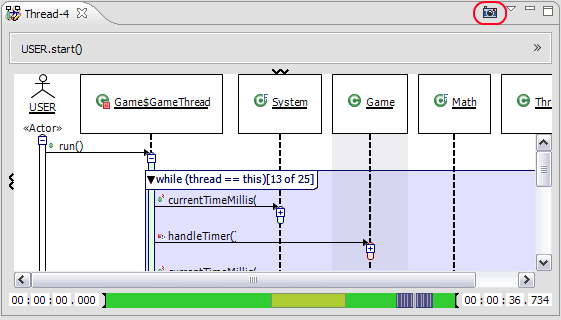
Capture Screenshots You can now save screenshots of your sequence diagram. Select
the "camera" icon,
and you will be able to save an image of the main pane of the sequence
diagram as a PNG, JPG, or BMP.
Exporting Traces Diver is now able to export a complete trace to be shared with your
collegues.
Importing Traces If you can export, you have to be able to import. Use the import
trace wizard to open a Diver Trace (dvt) file. The file will be imported
and analyzed just as if you ran the trace yourself.
Filtering Empty Threads Diver keeps a record for all threads in your traces, even if no events
occur in them. In previous versions, this could cause a lot of clutter
in the Program Traces view. Now, you can filter empty threads and
get rid of the clutter.
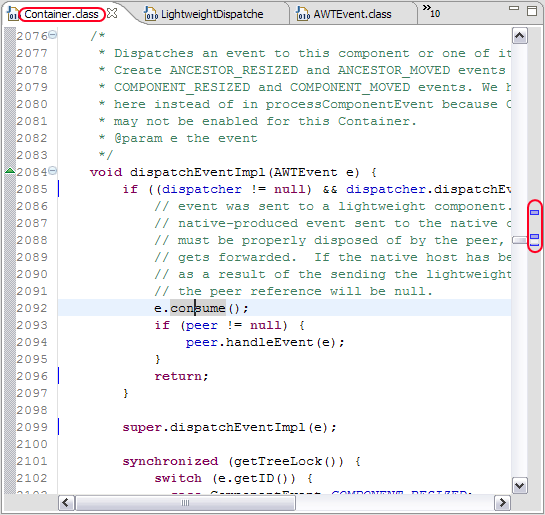
Marking Code Executed in Jar Files In previous versions, it wasn't possible to view executed
lines of code in .class files contained in Jars because of limitations
in Eclipse's Resource framework. So, I used Diver to figure out how the
JDT sets breakpoints in Jar files, and I was able to use what I found
to add markers to Jar files for use within Diver.
Toggle Combied Fragments and Loops If, for some reason (and I don't know what that would be :-) ),
you don't like seeing your sequence diagram decorated with source
code information, you can shut off combined fragments and loop compaction.

Exceptions If a method returns due to an exception, it is now indicated in
the sequence diagram.

Diver Research Diver is a research project at the University of Victoria. Diver
now makes it easier for you to help us with our research by logging
information about how you use it. You can automatically upload these
logs to our server, or you can shut off logging using the Workbench
Logger preference page


If you already have Diver installed, you should be able to get the new version just by updating your Eclipse. Otherwise, you can use our p2 repository site: https://diver.svn.sourceforge.net/svnroot/diver/Release.

I hope that this new version will be useful to everyone. I've put a lot of hard work into it. It's 100% open source, so its free to you. But, please remember that Diver is a research project, so help me out with my research. Use it for a while, and then fill out our survey. Also, this new version of Diver has a logging feature that will keep track of some of your interactions with Diver. It's all anonymous information, and you can turn it off at any time (using the Workbench Logger) preference page. We don't get the data unless you explicitly agree to send it to us (Diver will ask you permission before uploading). But, please participate. I have to graduate sometime ;-).

Anyway, happy coding!