I've worked in the field of computer science and software engineering research off-and-on for almost ten years: first, as a software developer and research associate and then, in the last 3 years, as a masters student. In that time, I've been able to work on a number of very interesting and innovative projects. That is what I think is a great advantage of academia. At least in theory, academics are meant to be free to investigate new ideas, new theories, and new technologies without the obligation to provide a product that will generate profit.
However, in the time that I've been involved in academia, I've learned enough to become a little critical of it as well. There is a well-known mantra that in academia one must, "publish or perish." If you don't run studies and publish papers, then you won’t make it as an academic. Since grants and fellowships are awarded based, in part, on the curriculum vitae of an academic, if the publications dry up, then the funding will as well. So there is a kind of “market value” that is put on research. It is based on what can be published, and it is adjudicated by conference chairs and journal editors.
I've reviewed my own fair share of papers. One thing that I and other researchers look for is rigor in research. Science needs rigor. It is important that a paper does not claim more than it can actually demonstrate. That means that the researchers have to work hard to design, implement, and run experiments. And they have to be careful about what they claim.
It’s my belief that modest claims in research are good claims. I think that in computer science and software engineering, we often research scenarios that are far too complex, with far too many variables to make large claims. Unfortunately, it is difficult to publish modest claims. They don’t seem exciting enough. It seems that I see a lot of reviews that want papers that demonstrate how a new technique or technology is better than all other predecessors or that helps all people in all situations. The average researcher just isn't up to the task. It is an impossible one.
It requires experiments that are too large and take too long. To make such strong claims, one needs to produce experiments that have statistical significance. When you are working with a new technology, that means that you need to pull from a large pool of unbiased, randomly selected participants that you can ask to try the technology, so that you can measure their usage of it, ask them about their reaction to it, and try to form some kind of generalizations and a theory about why the technology does or doesn’t work. The problem is that most researchers don’t have access to a large pool of participants, and the participants almost never can be randomly selected.
Even if these criteria can be met, the problem of gathering and analyzing data from these kinds of scenarios can become almost insurmountable. For my thesis, I, my supervisor, and several others designed and performed a study that involved ten participants in total. With only ten participants, it took us several months to transcribe and review the videos, analyze logged data from the application, etc., etc. If we had as many participants as we needed to gain statistical significance, it would have taken us years to complete the research.
In such a fast-moving realm as computer science and software engineering, this kind of long turn-around time is very frustrating. It makes research seem to lag behind the innovations of commercial and Open Source projects. It also makes it difficult to do future research. Since the results lag behind the results of production software, it is difficult to convince professionals to participate in experiments. It is a large cost (in terms of time and money) for what they see as a small reward. This will make it more difficult in the future to perform academic experiments that are able to make strong claims.
It might be time for academics to re-evaluate the goals of computer science and software engineering research. What kinds of problems are they trying to solve, and what is really important? From my perspective, my own research has been a success. I started my masters not as an academic, but as a software developer. I had problems in my day-to-day programming that needed solving. My masters work gave me the opportunity to work with some excellent and smart people and come up with a workable solution. I was able to produce the Diver tool and hand it to the Eclipse community, which has always been a community that fosters innovation and excellent technical solutions.
The results of the work, however, have been difficult to publish. In spite of the recognition that Diver got by being named a finalist for "Best Developer Tool of the Year," the results of our research have yet to be published outside of my masters thesis. I get the distinct feeling that I can make a bigger impact by working toward building real solutions for real developers than I can by trying to convince conference chairs that the solutions are worth-while.
So, I’m leaving the Diver project in the capable hands of the CHISEL group at the University of Victoria, and moving onto a new chapter in my life. I've been offered a job at Microsoft and I start tomorrow. It has been great working at the University of Victoria. There are some really smart, creative, and inspiring people there. It has also been great working within the Eclipse community. I truly believe that the work done with Eclipse has changed the way that people develop software. The community is great and so are the products.
In the end, I'm really just interested in designing and implementing good solutions to real-world problems. Microsoft has offered me what seems to be an exciting opportunity to do just that. As an added bonus, it pays better than the wage of a masters student :-). So, this will be my last post to Planet Eclipse. Thank you everyone for your support over the years and I wish you all the greatest blessings.
The Diver project is still available on Sourceforge. If you like, you can find my masters thesis here.
Monday, September 5, 2011

Monday, August 8, 2011
New Version of Diver Available

So, I just defended my Masters thesis today, and I figured that I would celebrate by releasing a new version of my thesis project Dynamic Interactive Views for Reverse Engineering. It's a tool that allows you to dynamically trace the execution of your software, and focus in on particular features and bugs to help you analyze and understand it.
First of all, I'm going to apologize for not being very active around here since EclipseCon. I've been too swamped with finishing off my thesis. But, in the last little while, I've been able to work on Diver and make some updates. Unfortunately, since I am finished my Masters now, I won't be personally releasing new versions Diver anymore. But, it is remaining with the CHISEL group at the University of Victoria, and it will hopefully pass to other capable hands. More about that, though, in a future post.
Anyway, there are a couple of enhancements to Diver, including the ability to trace your JUnit tests, and the ability to view sequence diagrams that are generated directly from source code without the need to create an execution trace. More information can be found on the Diver web page.
You can install Diver using the Eclipse Marketplace, or by following the instructions on the Diver web page.
You can install Diver using the Eclipse Marketplace, or by following the instructions on the Diver web page.
Friday, March 25, 2011
Reflections on EclipseCon
Thanks to everyone at EclipseCon this past week for making it a great experience. JaxEnter asked me to write a short reflection about my experiences. I don't want to steal traffic from them, so you can see the article by following the link above :-).
The article is technology-centric. It was difficult for me to choose from among the many great things that are going on with Eclipse since it is such a vibrant and innovative community. The technologies in the article have heavy support from the top-level projects, so they will be interesting to follow. Also, in reality, they only reflect my own interests and experience and I could not have possibly seen everything going on at EclipseCon. That isn't to diminish any of the other great technologies that are built on Eclipse. There are a tonne of them that have become so integrated into my daily work, that I barely even notice them anymore. That's a real compliment, I think.
The best thing, really, though is the community. I have to admit that it was a little difficult to get to talk to people before I gave my talk on Wednesday. After that, though, I had a few great conversations. I'd like to make a shout-out to the guys over at Ericsson. For the past while, we have been working on the same set of problems, with support by the same funders. We had to go all the way to California for EclipseCon before we had heard about each other, though. It's a funny world.
Oh well, time to head back home. Good-bye cold, rainy California. I'll be going back to the rain and palm trees of Victoria :-).
Monday, March 14, 2011
Tracing Web Apps Using Diver
Diver is a tool designed to help Java Developers understand how unfamiliar, or long-forgotten, software works. It lets developers easily trace the actions of Java Software and analyze it using an advanced Sequence Diagram View and some workbench filters that help focus on the software artifacts associated with particular features of the software.
With more and more applications moving to the Web, I've been asked a number of times, "Can Diver trace web apps?" I've always told people that it is possible to do, but I haven't given detailed instructions on how to do it. This post will hopefully remedy that.
First, a few notes. The version of Diver used to illustrate the points in this post is 0.3.1. It isn't an official release yet because there is still some testing to be done. I've had to do some tweaking to Diver, though, to make tracing web apps a little easier. So, you can get your copy of Diver 0.3.1 by pointing p2 to http://diver.svn.sourceforge.net/svnroot/diver/Development. Another thing: Diver only traces Java, not JavaScript. So, Diver can't be used to help get at any JavaScript errors that are running in the browser. It can, however, trace Java apps that have been deployed on a Java-enabled web server such as Jetty, Tomcat, or JBoss. That includes code invoked from JSPs. In this post, I'll be using JBoss 5.0.1GA. There is no particular reason for that. I've used Diver to trace applications deployed in Jetty as well.
Install And Deploy Your Web App
The focus of this post is on tracing web apps, not on setting up web servers. So, I assume that you have your server ready to go. It's probably best, though, that you run on a small test server on your localhost rather than on a deployment machine. That just keeps things compact and easier to manage.
Diver works best if you have the source code for that app. It isn't strictly necessary, but it makes the tools that Diver offers a lot more powerful. At the very least, you have to be able to deploy your app into your own web server. You can just build and deploy your web app the way you normally would. For example, in JBoss, this would typically involve copying a WAR file into the jboss_root/server/server_name/deploy directory. When you are tracing your app, Diver will actually be tracing the copy that has been deployed on your server, not the version that is in your workspace. So, after you make any changes to your code, be sure to rebuild and redeploy before running your trace. Then, Diver will be able to match the calls to various methods/classes in the deployed WAR to those classes in your workspace, making it a lot easier to find things.
Preparing for Launch
When tracing a Java Web App, what we are really doing is capturing specific events that happen inside a Java web server instance. So, the application we will be tracing is the Java Web Server. Ideally, Diver would be able to interact with the Eclipse Web Tools Platform so that you could just fire up a trace of a web server launch. Unfortunately, I haven't gotten that far yet. Fortunately, though, programs like JBoss are really just Java applications, so we can use the Java Application Trace functionality of Diver to grab a trace, but it will take a little set up first.
The Diver Java Application Trace is just an extension of the JDT Java Application Launch. The JDT requires that the applications it launches are visible in the workspace, so Diver requires the same. That doesn't mean, though, that you have to have all of the JBoss source to get started. You can launch directly from your installed JBoss instance. To get JBoss to run, you just need to make the right jar files visible. This is how you do that.
I suggest that you make the appropriate jars visible in their own project. You could, possibly, create dependencies to JBoss or Jetty, or what-have-you, in your web app's project, but that could cause build problems or runtime errors if your web app needs its jars to be isolated from the server. I just create a small Java Project called JBoss:

Once the project is created, you need to make the JBoss launch jar visible. To do that, just select the JBoss project in the Package Explorer or the Navigator and choose File>Properties <Alt+Enter> from the menu. Jump over to the Libraries tab of the Java Build Path settings page, and select Add External Jars:

The jar that you are looking for is run.jar. It's just the JBoss launcher. On my computer, it is found in C:\jboss-5.0.1.GA\bin:

That's all that you need for preparation. Now, we can get onto the launch.
Setting Up The Trace
Now that the JBoss launcher is visible to Eclipse, we can get onto running it to gather a trace of our web app. Open up your Run or Debug Configurations dialog, and create a new Java Application Trace. In the Main tab, set the Project to the one we created earlier. The Main class that we will use is just org.jboss.Main. Simple enough:

Your web server will likely require a number of arguments to be passed both into the program and into the VM. Go to the Arguments tab. JBoss requires the following arguments:

Program Arguments:
-c <server> where <server> is the name of the configured server that you deployed your web app into. I typically just use default one supplied by JBoss, so my program arguments are -c default.
VM Arguments:
-Xshare:off -Dprogram.name=run.bat -server
-Dorg.jboss.resolver.warning=true
-Dsun.rmi.dgc.client.gcInterval=3600000
-Dsun.rmi.dgc.server.gcInterval=3600000 -Xms128m -Xmx512m
-XX:MaxPermSize=256m
-Xshare:off is a Sun/Oracle specific VM argument that is there for Diver's sake. It tells the VM that this launch will not share its classes with anyone (the Java VM allows different processes to share the same loaded classes unless this flag is set). If you aren't using the Sun/Oracle VM, get rid of this argument. The other ones are there for JBoss. The really important ones (I think) are -Dprogram.name=run.bat (or run.sh if you are running on Linux) and -server. You can set the heap and Perm Gen sizes according to your liking.
Working Directory:
/jboss_home/bin. On my computer, this is just C:\jboss-5.0.1.GA\bin. This has to be set so that JBoss can know where it is running from and resolve all of its own resources.
If you are wondering how I discovered what all of these arguments should be, I did it by inspecting the run.bat script that is used to launch JBoss. The script just sets a bunch of default variables, and I used those. Another thing that you should be aware of is that you need to have your JAVA_HOME environment variable set to a valid JDK. A normal JRE might work, but (depending on the version of your server) it may not be able to compile JSPs unless you have the JDK. I'm sure you already knew that, but I'm just throwing it out there for good measure.
Tweaking The Trace
That is all you technically need to do to get started. Now, you can just select the Run button and start gathering information like you normally would with Diver (see the Diver documentation). But there are a few things that you can do to tweak the trace and make sure it is efficient. Web apps can be slow as it is. Tracing them introduces i/o overhead that we would like to minimize. Go over to the Java Trace tab of your configuration, and set it up to look something like this:

First of all, you are likely only interested in the things that your web-app is doing, so I suggest selecting the Set Filter Manually option, and adding only the packages that are a part of your web app to the Inclusion Filters area. By Default, Diver will analyze the trace and only watch for methods defined in the project that is named in the Main tab of the launch configuration. In this launch, there is nothing but the JBoss launching jar, so the analysis would end up being mostly useless unless you set the filters manually.
I also suggest making sure Pause On Start and Apply Filters at Runtime are checked. Pause On Start is the default, and it just means that none of the start-up process of the program will be traced. You can define what actually gets recorded in real-time using the Eclipse Debug View as described in the Diver documentation.
Older versions of Diver (0.2 and earlier) recorded absolutely every method call, and "rejected" data based on the defined filters during a separate analysis step. Since version 3.0, Diver allows you to reject that data before it gets stored, which can speed up your traces and your analysis by many, many times. Make sure Apply Filters at Runtime is checked to enable this speed up.
Get Going
There you go, that is all you need to get a trace of a web app using Diver. Now, you can record and compare traces to focus in on specific bugs or features in your app and use Diver's sequence diagram to analyze what is going on. The Diver documenation, and the video tutorials tell you how to do all that fun stuff:

There is just one more small bit of housekeeping that you might want to be aware of. Launching a web server in this way doesn't give you a clean, interactive way to shut it down. You can always just use the "Stop" button in the Debug View to force it to quit, but that could leave your server in an undefined state. I suggest opening up a console, and using your web server's shutdown command. For JBoss, all you have to do is type shutdown -S.
That's all for now. If you are out at EclipseCon, make sure to come to my talk where I'll be presenting Diver and how it helps users of Eclipse understand their software. Happy coding!
That's all for now. If you are out at EclipseCon, make sure to come to my talk where I'll be presenting Diver and how it helps users of Eclipse understand their software. Happy coding!
Tuesday, March 1, 2011
Diver is a finalist for an Eclipse Community Award
I've been swamped with work lately, so I'm afraid that I haven't been able to devote much time to blogging. But I got news today that my Diver tool has been selected as a finalist for the Best Developer Tool category along side the excellent Pydev environment for the Python language. Diver has really been my baby for the past couple of years. I've been working hard on trying to solve the problems associated with understanding software. I hope that Diver can help developers in that respect (I know it helps me :-) ). Even so, it is a great honour to be selected as a finalist from among more than 40 other excellent solutions. Eclipse has such a vibrant developer community. There is a solution out there for almost every problem.
If you are going to EclipseCon, be sure to check out my talk to find out more about Diver and how to incorporate reverse engineering into your everyday work to improve your understanding of software.
Tuesday, December 21, 2010
See you at EclipseCon!
I felt like I won an award this morning when I found this in my email:
I'm certain that EclipseCon will be excellent, and I hope to do my part in making it that way. So, everyone come and check out my talk if you have the time: https://www.eclipsecon.org/submissions/2011/view_talk.php?id=2099
Dear Del Myers,

We are pleased to accept your proposal "Put It In Reverse: Using Eclipse to
Understand Code that has Already Been Written" for EclipseCon 2011.

The Program Committee received many excellent submissions, and we're
very happy to include "Put It In Reverse: Using Eclipse to Understand Code
that has Already Been Written" in that select set.

Thank you for helping to make EclipseCon 2011 the best one yet!
I'm certain that EclipseCon will be excellent, and I hope to do my part in making it that way. So, everyone come and check out my talk if you have the time: https://www.eclipsecon.org/submissions/2011/view_talk.php?id=2099
Tuesday, December 7, 2010
Interview about Diver
The online magazine JaxEnter.COM recently interviewed me about my tool Dynamic Interactive Views for Reverse Engineering (Diver), which is an open source tool for bringing reverse engineering processes into the hands of us ordinary developers. Wondering what this tool has to offer? Check out the interview: http://jaxenter.com/diver-interview-32838.html
Thursday, November 25, 2010
Diver version 0.3.0
Last night, I released version 0.3.0 of Diver. It has been a while since I've written here. I've been busy with other work that had to be done. So, for those who may no longer be familiar with Diver, I will take a moment to step back and let you know what it is all about.
Diver stands for Dynamic Interactive Views for Reverse Engineering. The basic of Diver is to make some reverse engineering tools and techniques easily accessible to us Java developers who use Eclipse. Some really common problems that I have had in maintaining software are trying to figure out answers to questions like, "Why did that happen?", "Where is that implemented?" and, "How does that work?" Diver offers tools to help you answer those kinds of questions. The techniques realized in Diver use execution traces of your running Java software so that you can get a picture of what is really going on at runtime rather than having to guess at what might be happening based on class hierarchies or keyword and reference searches. It isn't meant to replace your current debugging and investigation techniques. It is meant to offer you a few extra tools to augment your current work practices. Diver has its own website: http://diver.sf.net. You can go there to find out more.
Now, onto the cool new features of Diver 0.3.0. Some highlights are on Diver's New and Noteworthy page, but these are the ones that I'm most excited about:
More Efficient Tracing
I've put a lot of effort into cutting back trace sizes and reducing the amount of time that it takes to analyze the traces for use in Diver. Previous versions recorded everything (every single method call) that was executed during the run of your program and applied custom package and class filters during a separate analysis step. In Diver 0.3.0, it is possible to apply those filters up-front so that you can control which methods get called during execution. This can make your target program more responsive and greatly reduce the amount of time that it takes to do the second analysis step. The Diver documentation gives more information about how to set this up.
Compare Traces Using the Sequence Diagram
Diver has always offered a cool feature which allows you to compare the difference between traces. It offers a filter on the Eclipse package explorer which allows you to locate method calls unique to a particular trace (or to a particular thread of execution within that trace). That filter has never been applied to the sequence diagram viewer offered by Diver, however. Any solution just seemed to inefficient to be able to apply to the massive amounts of data that the sequence diagram has to be able to display. Well, I've figured out a way to do it which seems to be quick enough for my own usage, so hopefully it will be for you as well. It is now possible to see which method calls are unique to a particular trace directly within the sequence diagram:

Methods that are not unique to the trace can either be shown in grey, or hidden completely:

This feature (and several others) are highlighted in the following video. It is a pretty good video for just giving you an overview of what Diver has to offer as well:
If you want to install Diver, the p2 site is here: http://diver.svn.sourceforge.net/svnroot/diver/Release. Or, if you are using Eclipse 3.6, you can use the totally awesome Eclipse Marketplace to install it directly. Just do a search for the keyword: Diver.
Friday, June 25, 2010
Diver in linux
Some people may be having difficulty with Diver in various distributions of linux. You may be getting the following message when trying to launch a trace.

And you may see this in the console:
Now, you may be surprised to find out that these errors may have nothing to do with open ports or whether or not the file listed exists. This is not Diver's fault. The client can't find an open port because the Java virtual machine couldn't start and open one. The Virtual machine couldn't start not because the listed library is missing but because you might not have some of the dependencies installed on your system. Unfortunately, the Java VM sometimes gives some pretty uninformative error messages.
Diver depends on the C++ boost libraries to do socket communication and multi-threading. It also uses boost to do multi-platform file system manipulation. Many distributions of linux come with boost installed. Some do not. If you have a debian-based version of linux, installing the required boost libraries is easy:
If you are running a redhat distro, you should be able to use a similar

And you may see this in the console:
Error occurred during initialization of VM

Could not find agent library in absolute path: /[path-to-plugin]/libsketch_linux32.so
Now, you may be surprised to find out that these errors may have nothing to do with open ports or whether or not the file listed exists. This is not Diver's fault. The client can't find an open port because the Java virtual machine couldn't start and open one. The Virtual machine couldn't start not because the listed library is missing but because you might not have some of the dependencies installed on your system. Unfortunately, the Java VM sometimes gives some pretty uninformative error messages.
Diver depends on the C++ boost libraries to do socket communication and multi-threading. It also uses boost to do multi-platform file system manipulation. Many distributions of linux come with boost installed. Some do not. If you have a debian-based version of linux, installing the required boost libraries is easy:
$ sudo apt-get install libboost-iostreams1.40.0 libboost-date-time1.40.0 libboost-filesystem1.40.0 libboost-system1.40.0 libboost-thread1.40.0If you are running a redhat distro, you should be able to use a similar
yum command. I hope that this all works for everyone.
Friday, June 18, 2010
Awesomeness in Helios
There was a recent post by Wayne about how Eclipse is an IDE Platform. For all practical purposes, that is the way that I use it. But what is really awesome about Eclipse as an IDE platform is that it is an IDE platform that just keeps improving.
I have to admit that I honestly don't keep up with the latest improvements to the Eclipse IDE. The reason is simply practical. I work on making tools for doing research on IDEs. I would like my current project, Diver to be as compatible as is reasonable so that I can decrease the barrier to adoption. If I work with the "latest and greatest" version of Eclipse, I am just too tempted to use the "latest and greatest" features of Eclipse in my own tools, which means that people running the current release may not be able to work with what I am building. It's really just a matter of discipline.
But now that Helios is about to be released I've started to use it and I find it totally awesome. Ian Bull has been faithful to his top ten list of the newest and greatest features of Eclipse. I don't know if I will do the same, but I think I might report on the great things about Eclipse as I discover them.
So far, the number 1 through 10 greatest feature of Helios for me has been its new integration with the Eclipse Marketplace (and the Yoxos Marketplace catalog). I just recently had to change computers which meant that I also had to reinstall Eclipse. Normally, I would use Yoxos to create my own custom distribution of Eclipse, but I wanted to try Helios and all its cool new features. I use a number of 3rd party tools that aren't available in the standard Eclipse p2 repositories. For example, I work in academia which means that I write papers. I use LaTeX for writing papers, which is a surprisingly process to writing software. So, I use Eclipse to write text as well as software. It used to be total pain to search for my LaTeX plug-in, add its p2 repository to my list of "Available Software Sites", and install. That is no longer the case. Now, I can just load up my Eclipse Marketplace client and do a quick search for "LaTeX":

And there you go. No hassle, no fuss, I just install and that's it. It's beautiful.
As an aside (and a shameless plug), you can do the same thing with my project "Diver". Just load your Eclipse Marketplace client. A quick search for "reverse engineering" will point you straight to my favorite Eclipse tool ;-) :

Thursday, June 3, 2010
Eclipse Labs: To Migrate or Not to Migrate?
I'm really happy about the recent creation of the new Eclipse Labs. While I would absolutely love to have my Diver project as an official Eclipse project in incubation, I'm afraid that the process is too heavy-weight. I work in research which often requires a very malleable programming schedule... I don't think that I would be able to hit the release targets of Eclipse. Plus the IP process can be a little long. My friend and colleague Ian Bull was able to make his Zest project an official Eclipse project (it is now part of GMF/draw2D) while he was doing his Ph.D... he did have a little programing help from some of the other members of our lab ;-). I'm a Masters student, though: the program is too short to wait for my project to be approved by the committers.
So, Eclipse Labs is exactly perfect for what I need. It has the benefit of the Eclipse brand, but it doesn't carry the baggage of official Eclipse projects. It's too bad that it wasn't available six months ago when I was making Diver a tool open to the public. The best option I had at the time was SourceForge, which has been quite good, really.
So, now I'm left with the question of whether or not to migrate Diver to the Eclipse Labs hosting. I would really like Diver to have a closer tie to the Eclipse brand. But, I would lose a lot of work that was put into creating the project content for Diver over at SourceForge. Most specifically, I would lose are the hard work that I put into creating the web site. Google code has its wiki, which is OK, but it isn't as rich as what I've been able to make with my web page.
So: to migrate, or not to migrate? I don't know. Is there any real benefit?
Tuesday, May 25, 2010
New version of Diver available today!
Actually, it's been available for about a week, but I just haven't had time to blog about it. I've been busy with other work.
For those of you who don't know, Diver is a research project of the CHISEL group at the University of Victoria. We are trying to find better ways to help programmers develop, debug, and understand their software. Diver does this by bringing some techniques from reverse engineering into your Eclipse IDE. It can generate execution traces of your software which it uses to adjust the UI of your IDE to draw your attention to the features of your software that you are looking for. Diver is the product of several years of research and development, so it is feature-rich and robust. You can find out more about Diver at our website: http://diver.sf.net
OK, that's enough of the sell... I should let you know what you get with this new version of Diver.
If you already have Diver installed, you should be able to get the new version just by updating your Eclipse. Otherwise, you can use our p2 repository site: https://diver.svn.sourceforge.net/svnroot/diver/Release.
I hope that this new version will be useful to everyone. I've put a lot of hard work into it. It's 100% open source, so its free to you. But, please remember that Diver is a research project, so help me out with my research. Use it for a while, and then fill out our survey. Also, this new version of Diver has a logging feature that will keep track of some of your interactions with Diver. It's all anonymous information, and you can turn it off at any time (using the Workbench Logger) preference page. We don't get the data unless you explicitly agree to send it to us (Diver will ask you permission before uploading). But, please participate. I have to graduate sometime ;-).
Anyway, happy coding!
For those of you who don't know, Diver is a research project of the CHISEL group at the University of Victoria. We are trying to find better ways to help programmers develop, debug, and understand their software. Diver does this by bringing some techniques from reverse engineering into your Eclipse IDE. It can generate execution traces of your software which it uses to adjust the UI of your IDE to draw your attention to the features of your software that you are looking for. Diver is the product of several years of research and development, so it is feature-rich and robust. You can find out more about Diver at our website: http://diver.sf.net
OK, that's enough of the sell... I should let you know what you get with this new version of Diver.
| Faster Tracing | The tracer has been optimized. Tests indicate that it is between 2 and 4 times faster than version 0.1.0 |
| Capture Screenshots | You can now save screenshots of your sequence diagram. Select the "camera"  icon, and you will be able to save an image of the main pane of the sequence diagram as a PNG, JPG, or BMP. 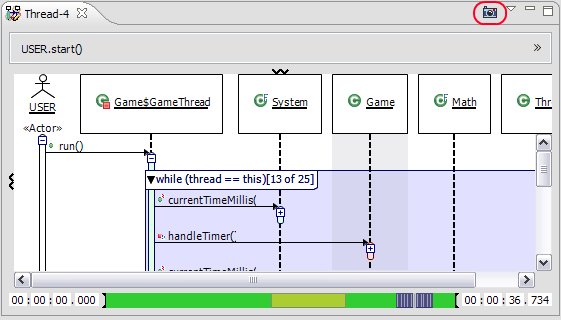 |
| Exporting Traces | Diver is now able to export a complete trace to be shared with your collegues.  |
| Importing Traces | If you can export, you have to be able to import. Use the import trace wizard to open a Diver Trace (dvt) file. The file will be imported and analyzed just as if you ran the trace yourself.  |
| Filtering Empty Threads | Diver keeps a record for all threads in your traces, even if no events occur in them. In previous versions, this could cause a lot of clutter in the Program Traces view. Now, you can filter empty threads and get rid of the clutter.  |
| Marking Code Executed in Jar Files | In previous versions, it wasn't possible to view executed lines of code in .class files contained in Jars because of limitations in Eclipse's Resource framework. So, I used Diver to figure out how the JDT sets breakpoints in Jar files, and I was able to use what I found to add markers to Jar files for use within Diver. 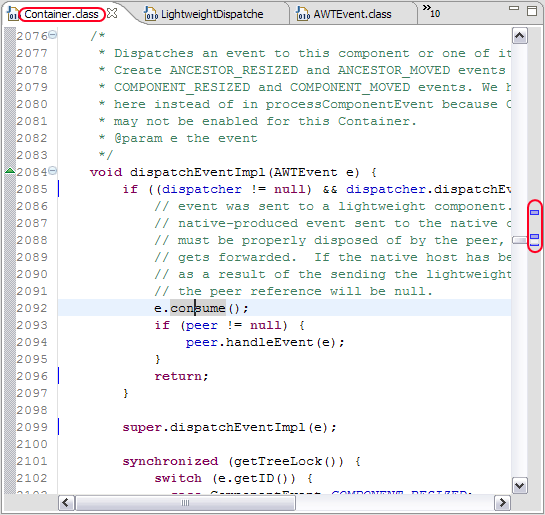 |
| Toggle Combied Fragments and Loops | If, for some reason (and I don't know what that would be :-) ), you don't like seeing your sequence diagram decorated with source code information, you can shut off combined fragments and loop compaction.  |
| Exceptions | If a method returns due to an exception, it is now indicated in the sequence diagram.  |
| Diver Research | Diver is a research project at the University of Victoria. Diver now makes it easier for you to help us with our research by logging information about how you use it. You can automatically upload these logs to our server, or you can shut off logging using the Workbench Logger preference page  |
If you already have Diver installed, you should be able to get the new version just by updating your Eclipse. Otherwise, you can use our p2 repository site: https://diver.svn.sourceforge.net/svnroot/diver/Release.
I hope that this new version will be useful to everyone. I've put a lot of hard work into it. It's 100% open source, so its free to you. But, please remember that Diver is a research project, so help me out with my research. Use it for a while, and then fill out our survey. Also, this new version of Diver has a logging feature that will keep track of some of your interactions with Diver. It's all anonymous information, and you can turn it off at any time (using the Workbench Logger) preference page. We don't get the data unless you explicitly agree to send it to us (Diver will ask you permission before uploading). But, please participate. I have to graduate sometime ;-).
Anyway, happy coding!
Tuesday, February 2, 2010
The Perils of Multi-Platform Eclipse Development
Writing code for multiple platforms is a challenge. It not only increases the complexity of your code and tests, but it also increases the complexity of your build process. The build process is what I have had trouble with as of late. So, I'm logging my struggles so that I, and you, might have some place to go the next time multi-platform deployment causes headaches.
So, here is my problem. I have a plug-in that has a little bit of platform-specific code in it. The code works on both windows and linux, and I have precompiled binaries for them. In other words, the build of the (C++) native code doesn't need to be part of my build process. I do that separately just because it is easier. Setting up cross-compilers is a nightmare, and takes more time than I have.
So, here is what I do: I separate my native code into plug-in fragments for windows and for linux. After that, I have to go through all of my different manifests to make sure that P2 knows what to do with the the fragments. First, a

OK, then I have to set up my fragments to make sure that the platform filters match their target environment:

Platform filters are basically read as a functional notation, where sets of attributes are bound to operators. For example,
OK, now one might expect that everything is ready to export. After all, the binaries don't depend on any native Eclipse fragments (they don't reference SWT or anything). So, it seems that my fragments should be able to be packaged up just like anything else.
That's not the case however. When you run a build in PDE, and you put a platform filter on a fragment, Eclipse checks your current target platform and builds only for what you currently have. I, for example, have a machine with Windows XP on it, and that is the version of Eclipse that I downloaded. So, Eclipse will build only the windows fragment for me. There is no option to build for other platforms. If I use the Export Deployable Features wizard, this is what I get:

Even though my fragments don't have any dependencies on any other platform-specific code and all I really need is a jar with my binaries in it, the PDE says, "No! I can't build that for you." OK, that's fine. I know that it is possible to build for multiple platforms (the SWT guys do it), so I did some searching.
It turns out that what I need is something called the Eclipse Delta Pack. The Delta Pack is basically a bunch of fragments for different platforms which include native code for user interfaces and other i/o such as file manipulation. Getting the Delta Pack can transform your Eclipse workbench into a catch-all platform which targets everything that Eclipse can manage.
The unfortunate thing is that the Delta Pack isn't that easy to find. If you go to the Eclipse Download page, you won't find any reference to it. You have to go down to the bottom of the page, and find the Classic Eclipse distribution. And select Other Downloads:

Once there, you will want to get the release that you are targeting (probably somewhere in the 3.5.1 stream or later), and look to the left-hand menu. You will find the Delta Pack there:

Or, you can follow this link for the 3.5.1 drop.
When you download the Delta Pack, you have to unpack it. Make sure that you don't unpack it over your current Eclipse install. That could make things go bad. Instead, unpack it somewhere else and you can tell Eclipse to add it to your target platform.
To do that, go to your Eclipse Preferences, and find the page for Target Platform, select the running platform, and Add the Delta Pack to it as an Eclipse Install:

After that's done, you will have a new magic option in your Export Deployable Features wizard called Export for multiple platforms. That's exactly what I was looking for!

So, one would think at this point that one could simply export all of the features, upload them to a P2 repository, and release the new version. Not so fast. If you are me and you do that, you get this bug report.
It was silly of me. I shouldn't have assumed that the build would work flawlessly without testing. So, I checked my P2 repository, and low-and-behold, the Linux fragment was missing. That seemed strange. After all I did export for Linux. There's no rocket science here. It's just a pre-compiled binary after all.
So, after hours of fighting with trying different combinations of platform filters, and different ways of building, there were no warnings and no errors in the build. Unfortunately, there was also no Linux fragment. It just would not get created on my windows box. I was about to go and file a bug on P2, when I decided that maybe I should just try to get the build on Linux. So, I went through all the above steps again on a fresh install of Eclipse on a Linux machine. What I expected to happen was that it would build fine on the Linux machine, but instead of not having a Linux fragment, I would be left without a windows fragment.
That isn't what happened. I did get a windows fragment. What was missing? You guessed it: the Linux fragment! My Linux machine failed to build the Linux fragment. But, at least I got an error this time:

It looks like there was something about my
I had used native code previously in an RCP toy application in which I was experimenting with OpenGL. When I looked up how to do it at that time, I learnt that I was supposed to use various keys such as

I didn't really know what to do, though since this is what I had read was correct, and it was previously working. In fact it still works for the different Windows versions. Not for Linux, though. I don't know why. So, after another hour or so on Google, I learned about the key

And it works! So, I learned a few things from this whole process:
Anyway, that is all for now. I hope this can be helpful to anyone who is doing builds for multiple platforms. It isn't an easy problem to solve, so there are bound to be pain points. This post will hopefully get you (and me) through them quickly next time.
So, here is my problem. I have a plug-in that has a little bit of platform-specific code in it. The code works on both windows and linux, and I have precompiled binaries for them. In other words, the build of the (C++) native code doesn't need to be part of my build process. I do that separately just because it is easier. Setting up cross-compilers is a nightmare, and takes more time than I have.
So, here is what I do: I separate my native code into plug-in fragments for windows and for linux. After that, I have to go through all of my different manifests to make sure that P2 knows what to do with the the fragments. First, a
p2.inf file has to be made for each fragment and the host plug-in, so that P2 knows the fragments are installable units that should be downloaded. OK, that's fine. Then, I have to the feature.xml for the feature that contains my plugins and fragments to make sure that I specify the supporting environments:
OK, then I have to set up my fragments to make sure that the platform filters match their target environment:

Platform filters are basically read as a functional notation, where sets of attributes are bound to operators. For example,
(|(osgi.arch=x86)(osgi.arch=x86_64)) binds the selection of the attributes (osgi.arch=x86 and osgi.arch=x86_64) to the logical OR operator (|), so that it reads, "the osgi architecture can be either x86 or x86_64." So, I've got that down. I also had to set up the Bundle-NativeCode attribute in the manifest for the fragment so that my application knows where to find the binaries, but I'll get back to that later.OK, now one might expect that everything is ready to export. After all, the binaries don't depend on any native Eclipse fragments (they don't reference SWT or anything). So, it seems that my fragments should be able to be packaged up just like anything else.
That's not the case however. When you run a build in PDE, and you put a platform filter on a fragment, Eclipse checks your current target platform and builds only for what you currently have. I, for example, have a machine with Windows XP on it, and that is the version of Eclipse that I downloaded. So, Eclipse will build only the windows fragment for me. There is no option to build for other platforms. If I use the Export Deployable Features wizard, this is what I get:

Even though my fragments don't have any dependencies on any other platform-specific code and all I really need is a jar with my binaries in it, the PDE says, "No! I can't build that for you." OK, that's fine. I know that it is possible to build for multiple platforms (the SWT guys do it), so I did some searching.
It turns out that what I need is something called the Eclipse Delta Pack. The Delta Pack is basically a bunch of fragments for different platforms which include native code for user interfaces and other i/o such as file manipulation. Getting the Delta Pack can transform your Eclipse workbench into a catch-all platform which targets everything that Eclipse can manage.
The unfortunate thing is that the Delta Pack isn't that easy to find. If you go to the Eclipse Download page, you won't find any reference to it. You have to go down to the bottom of the page, and find the Classic Eclipse distribution. And select Other Downloads:

Once there, you will want to get the release that you are targeting (probably somewhere in the 3.5.1 stream or later), and look to the left-hand menu. You will find the Delta Pack there:

Or, you can follow this link for the 3.5.1 drop.
When you download the Delta Pack, you have to unpack it. Make sure that you don't unpack it over your current Eclipse install. That could make things go bad. Instead, unpack it somewhere else and you can tell Eclipse to add it to your target platform.
To do that, go to your Eclipse Preferences, and find the page for Target Platform, select the running platform, and Add the Delta Pack to it as an Eclipse Install:

After that's done, you will have a new magic option in your Export Deployable Features wizard called Export for multiple platforms. That's exactly what I was looking for!

So, one would think at this point that one could simply export all of the features, upload them to a P2 repository, and release the new version. Not so fast. If you are me and you do that, you get this bug report.
It was silly of me. I shouldn't have assumed that the build would work flawlessly without testing. So, I checked my P2 repository, and low-and-behold, the Linux fragment was missing. That seemed strange. After all I did export for Linux. There's no rocket science here. It's just a pre-compiled binary after all.
So, after hours of fighting with trying different combinations of platform filters, and different ways of building, there were no warnings and no errors in the build. Unfortunately, there was also no Linux fragment. It just would not get created on my windows box. I was about to go and file a bug on P2, when I decided that maybe I should just try to get the build on Linux. So, I went through all the above steps again on a fresh install of Eclipse on a Linux machine. What I expected to happen was that it would build fine on the Linux machine, but instead of not having a Linux fragment, I would be left without a windows fragment.
That isn't what happened. I did get a windows fragment. What was missing? You guessed it: the Linux fragment! My Linux machine failed to build the Linux fragment. But, at least I got an error this time:

It looks like there was something about my
Bundle-NativeCode property in the Linux fragment which the PDE build system didn't like. So, I went to investigate it.I had used native code previously in an RCP toy application in which I was experimenting with OpenGL. When I looked up how to do it at that time, I learnt that I was supposed to use various keys such as
processor= and os= to tell the plug-in when to use different compiled libraries. In fact, that is what I used in previous versions of Diver. When both the Windows and Linux binaries were in one fragment, it worked fine. But apparently, now that I had them in two fragments, that was very, very wrong:
I didn't really know what to do, though since this is what I had read was correct, and it was previously working. In fact it still works for the different Windows versions. Not for Linux, though. I don't know why. So, after another hour or so on Google, I learned about the key
selection-filter which works in the same way that the Eclipse-PlatformFilter does. So, I copied my platform filter into the Bundle-NativeCode like this:
And it works! So, I learned a few things from this whole process:
- You Need The Delta Pack. Why you need it for all multi-platform builds, I don't know. In my example, all I needed was to package up pre-compiled binaries into jar files. There doesn't need to be any dependency resolution for that, but the PDE needs the Delta Pack to do the build. That is relatively painless, so I don't mind.
- Pay Attention to the
Bundle-NativeCodeFormat. Eclipse won't necessarily tell you what is wrong. It might just fail to build a fragment or two without you even noticing. The safest way to get it to work just seems to be to copy yourEclipse-PlatformFilterdirectly into theBundle-NativeCodeproperty. At least you don't have to manage multiple different syntaxes that way.
Anyway, that is all for now. I hope this can be helpful to anyone who is doing builds for multiple platforms. It isn't an easy problem to solve, so there are bound to be pain points. This post will hopefully get you (and me) through them quickly next time.
Diver 0.1.0 Released (For Real This Time)
If anyone tried to download Diver 0.1.0 last week on their Linux boxes, you may have had a little trouble. It turns out that I didn't have everything set up correctly for a multi-platform build, and the Linux plugins weren't getting created. I'm going to blog about my experience in a minute, to keep it for posterity so that I can remember how to do it. Hopefully it will be useful for others as well. For now, here is a pretty picture to prove to you that things are good to go for you Linux users.

If you downloaded for Windows last week, I think that you should be fine. But, there won't be any harm in updating.

If you downloaded for Windows last week, I think that you should be fine. But, there won't be any harm in updating.
Wednesday, January 27, 2010
Diver 0.1.0 Released
There is a new version of Diver out, with a few new features which should make reverse engineering easier in Eclipse. A couple of highlights are the new "Notes" feature which can be accessed using Eclipse's Properties View, and the new Trace Search Page which helps you to find things in your traces. Diver is also a lot smaller in terms of its memory footprint now. For more information on what's new, check out the New To Diver 0.1.0 Page. To get Diver, just point your P2 "Available Software Sites" to https://diver.svn.sourceforge.net/svnroot/diver/Release. Diver works on Windows and Linux.
Some fancy pictures of the new features:

The new Diver Trace Search

Finding all the activations of methods that start with
get*
Finding all personalized notes stored in a trace
Friday, January 22, 2010
Diver tutorial videos available
Reverse engineering tools have traditionally suffered from a tremendous lack of adoption. There are likely several reasons for this. One is that they tend to come out of academia, and they never really get past the prototype stage. That is a shame because a lot of the ideas that have been proposed are really good ones. Another reason that they aren't often adopted is because it can be difficult to understand how to use them. The tools can be very cumbersome or they aren't very well documented.
I've tried to overcome both of these issues with Diver so that people will be able to see its use and it can be widely adopted. I have to say, my motivations aren't entirely altruistic: I do have to get my thesis done :-).
I've written a lot of in-depth documentation for Diver. But, let's be honest, I'm not even interested in reading all of those pages of documentation. So, for those of us with a shorter attention span, I've published several tutorial videos to get you started.

By the way, I made these tutorials using Wink. I highly recommend it for anyone who has to make a tutorial of their software. It's very easy to use and it gives you pretty well all the features that you could ask for. I searched for free screen capture software for a long while. This is the best that I could come by. If you've got any other suggestions, let me know.
Thursday, January 21, 2010
Survey on Reverse Engineering
Though I'm really a coder at heart, I am a researcher by day. I've been working hard on the Diver project to try and figure out ways that reverse engineering can be used to aid coders like you and me. If you've downloaded it and used it, please fill out my survey.
If you haven't tried Diver yet, please try it. I'm really hopeful that it can help you Java developers out.
If you haven't tried Diver yet, please try it. I'm really hopeful that it can help you Java developers out.
Friday, December 18, 2009
Diver's going to Spain!
A paper based on some of the innovations in Diver has been accepted to the 2010 European Conference on Software Maintenance and Reengineering. I will be presenting the paper in Madrid in March.
A lot of technical and technological innovation does come from academia. You don't always see it directly in the commercial products right away, but I do believe that it has influence. Especially as software engineering and computer science graduates move into industry, bringing their research expertise with them. A lot of the things that we take for granted in our IDEs were first written up in academic conferences or journals. Take the interactive debugger that we all use all the time as an example [Isoda, 87]. I think that industry and academia really benefit from good research relationships.
Anyway, it turns out that the way that Diver reduces the size of trace visualizations (in the sequence diagram) by cross-linking the trace with the source code is actually a new idea. So, the nice people at CSMR decided to let me write about it and give a presentation.
The paper is called "Utilizing Debug Information to Compact Loops in Large Program Traces." (Sounds exciting doesn't it? ;-) ). Everyone knows that most of the execution of any program is really caused by an enormous amount of repetitive calls to a subset of the methods/functions/subs/whatever that are written in the code. Most of these calls occur within loops structures. That causes a big problem for visualizing traces. Most standard programs will will have millions of calls in the span of a few seconds (Hello World in Java has upwards of 100 000 calls or something rediculous like that!). That's far too big for any standard visualization.
So, what Diver does that is unique is it recognizes that most of the repetitive calls will occur within loops that can be found in the source code of your program. So, it searches your source code (or the source code attached to your jars in Eclipse), and looks for where calls originate from. If they occur in a loop, then only one iteration of the loop is shown at a time.
I ran some experiments on several traced programs, including Eclipse, and found that you can get upwards of an 85% reduction in the size of your visualization (depending on the program that you tracing, and on the visualization--it's particularly good for sequence diagrams) just by compacting loops in this way. That's a pretty significant reduction. The Eclipse JDK was a huge help for this, by the way. It has awesome Java indexing, and a great Java parser that made my work a lot easier.
So, anyway, if you are in the vicinity of Madrid around March 15-18 2010, come by CSMR and say hello.
Wednesday, December 2, 2009
Diver now available on Linux!
I've had a number of requests to get Diver running on Linux. So, I've spent the past few days trying to get it done. I think that I've had success, but it needs more testing.

I've tested it on a Linux machine here at the university. The above screen shot was taken by X-forwarding Eclipse to my local XP machine using Cygwin/X. The native code is compiled to 32bit, so it should be compatible with pretty much any Linux machine. All the code is statically linked, so you don't need to have any libraries installed.
It hasn't been released to the "stable" stream (whatever that means in research ;-) ). You can install it from the "developer" stream using P2: https://diver.svn.sourceforge.net/svnroot/diver/Development. I haven't done integration tests on Windows yet.
Right now, both the Windows version and the Linux version are held in the same plug in fragment. I know it would be better to include only one of them for each platform. I'm a little confused about how to set up my features to do this though. Does anyone have any tips?
Monday, November 30, 2009
MANIFEST.MF: Apparently, you are just supposed to know this
I came across a funny error today while I was working with a plug-in fragment in Eclipse. I had a fragment that contained several resources for use in a host plug-in. All of a sudden, my host plugin was no longer able to find the resources from the fragment. I couldn't figure out why. Then I stumbled across some information about MANIFEST.MF files in Java jar collections. Apparently, there is a limit to the length that a line can be in a MANIFEST.MF file. If a line is more than 72 characters long, then it must be broken into more than one line. You can do so by breaking it on the 72nd character and continuing the next line with a space. My MANIFEST.MF file had one such line. So, changing the line from (imagine that there is no word wrap):
To:
Made it work. I knew that you could break lines, but I didn't know that you
had to break them. Now I know.
But this leaves me questioning: the standard says that you should break the line on the 72nd character. Does that mean that my example should have really looked like this:
? That just seems like a weird way of doing it.
Eclipse-Variable-Example: Here is my really long manifest
 line that is more than 72 characters
To:
Eclipse-Variable-Example: Here is my really long manifest
line that is more than 72 characters
Made it work. I knew that you could break lines, but I didn't know that you
had to break them. Now I know.
But this leaves me questioning: the standard says that you should break the line on the 72nd character. Does that mean that my example should have really looked like this:
Eclipse-Variable-Example: Here is my really long manifest line that is m
 ore than 72 characters
? That just seems like a weird way of doing it.
Subscribe to:
Posts (Atom)